#1
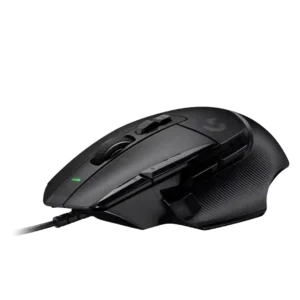
Best comfort
Tilt gesture controls are directly supported by reviews that note the wheel tilts left and right for horizontal input or extra controls.
Pros: charging convenience, Accuracy and tracking precision
Cons: weight tuning, RGB features
#2

Best for FPS
Highly rated
Tilt controls are strongly supported by the four-way wheel and left/right horizontal inputs, which reviewers found useful for extra functions.
Pros: programmable buttons, Bluetooth support
Cons: handedness options, firmware reliability
#3

Best for FPS
Tilt and 4D wheel controls are repeatedly mentioned, with reviewers noting side-to-side wheel input and extra programmable directions.
Pros: connection stability, 2.4GHz connectivity
Cons: handedness options, click noise
#4

Best for FPS
Tilt gesture controls are supported through the 4D wheel and left/right tilt functions, though broader scroll-wheel impressions remain mixed.
Pros: Accuracy and tracking precision, programmable buttons
Cons: weight tuning, firmware reliability
#5

Best for MMO
Tilt gesture controls are supported by the 4D scroll wheel, with reviewers noting side-click or left-right tilt functions.
Pros: MMO gaming suitability, onboard memory
Cons: dock compatibility, weight
#6
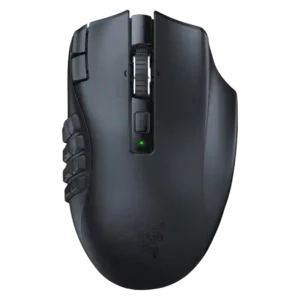
Best for FPS
Tilt controls are well supported through multiple descriptions of side-scroll, tilt-scroll, and wheel side inputs.
Pros: Accuracy and tracking precision, DPI range
Cons: handedness options, fingertip grip comfort
#7

Best for FPS
Tilt controls are a useful added input, with several reviews noting left and right scroll-wheel tilt actions.
Pros: acceleration control, long-session comfort
Cons: Bluetooth support, weight tuning
#8

Best for MMO
Tilt gesture controls are a standout feature across reviews, usually praised as useful or novel, though a few reviewers found sensitivity or reliability context-dependent.
Pros: sensor performance, programmable buttons
Cons: handedness options, cable flexibility
#9

Best for FPS
Tilt controls are present and programmable through left/right scroll-wheel tilt clicks.
Pros: click latency, switch durability
Cons: handedness options, weight
#10

Best for FPS
Tilt control evidence is conflicting: PCMag says tilt inputs are present, while other reviews say the wheel is not a tilt wheel.
Pros: macro support, click latency
Cons: dock compatibility, firmware reliability
#11

Best for FPS
Tilt gesture controls are available and useful in theory, but access is mixed because several reviewers find the wheel too low or awkward to tilt reliably.
Pros: programmable buttons, MOBA gaming suitability
Cons: dock compatibility, handedness options
#12

Best for FPS
Tilt controls add useful extra inputs, but reviewers also note wheel wobble, tipping, or accidental side clicks.
Pros: DPI range, materials quality
Cons: Bluetooth support, weight tuning
#13

Best for FPS
Tilt or joystick-style controls are the product's defining tradeoff: some reviewers found them clever and customizable, while many found them awkward or niche.
Pros: polling rate, charging convenience
Cons: software stability, firmware reliability
#14

Best for FPS
Tilt controls are a weakness because the available evidence says the wheel does not tilt horizontally or spin freely.
Pros: polling rate, weight
Cons: onboard memory, tilt gesture controls
#15

Best for FPS
Tilt gesture controls are weak because the review evidence notes the lack of scroll-wheel tilt, despite the separate side rocker.
Pros: Accuracy and tracking precision, motion consistency
Cons: debounce customization, tilt gesture controls
#16

Best for FPS
Tilt gesture controls score poorly because reviewers explicitly note the lack of tilt-wheel functionality.
Pros: DPI range, cross-platform compatibility
Cons: tilt gesture controls, battery life
#17

Best for FPS
Tilt controls are essentially absent because the middle mouse button lacks left/right tilt switches.
Pros: drag click support, wireless latency
Cons: RGB features, tilt gesture controls
#18

Best for FPS
Tilt gesture controls are absent; reviews explicitly say the wheel does not include tilt scrolling.
Pros: balance and weight distribution, weight
Cons: tilt gesture controls, RGB features
#19

Best comfort
Tilt gesture controls are effectively absent; the relevant review evidence says the wheel is pressable but not tiltable.
Pros: click latency, connection stability
Cons: tilt gesture controls, software stability
#20

Best for MMO
Tilt controls are not supported in the reviewed evidence; one reviewer explicitly notes there are no tilt controls.
Pros: motion consistency, connection stability
Cons: tilt gesture controls, water and dust resistance
#21
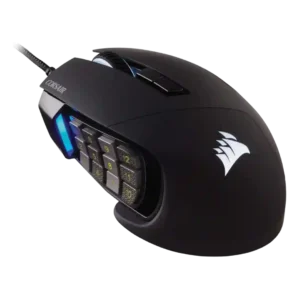
Best for FPS
Tilt gesture controls were a clear weakness in the only direct mention, which noted the lack of tilt scroll.
Pros: programmable buttons, build quality
Cons: handedness options, tilt gesture controls
#22
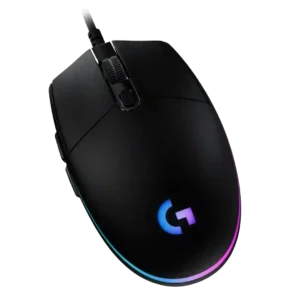
Best for FPS
Tilt and gesture-style scroll controls are absent in direct review evidence; the mouse wheel lacks side scrolling.
Pros: motion consistency, connection stability
Cons: weight tuning, 2.4GHz connectivity
#23

Best for MMO
Tilt controls are essentially absent, with one review explicitly noting that the scroll wheel has no tilt.
Pros: motion consistency, dock compatibility
Cons: tilt gesture controls, RGB features
#24

Best comfort
Tilt controls are essentially absent; reviewers explicitly note there is no tilt wheel or left/right scroll-wheel push.
Pros: surface compatibility, sensor performance
Cons: tilt gesture controls, MOBA gaming suitability
#25

Best for FPS
Strong consensus
Tilt gesture controls are absent, with reviewers noting the scroll wheel does not support tilt functionality.
Pros: battery life, charging convenience
Cons: weight tuning, handedness options