

Review: Corsair Sabre V2 Pro
Updated: 6 hours ago
3.7
Based on methodology below
137
Insights analyzed
50
Grouped by key features
19
From expert reviews
Scores below reflect consolidated expert coverage across these features.
Bottom Line
Choose it for ultra-light FPS play, smooth tracking, and simple remapping. Skip it if you need Bluetooth, stronger battery life, or truly competitive click latency.
Best for
Competitive FPS players who want a full-shell mouse that feels exceptionally light, fast, and easy to flick without paying flagship prices. It also suits small-to-medium hands best, with decent support for claw, fingertip, and many palm users.
Not for
Anyone who needs Bluetooth, richer onboard controls, or lots of extra buttons should look elsewhere. It is also a weak fit for buyers who prioritize long battery life, premium rigidity, or elite click-latency performance.
Verdict
The Sabre V2 Pro succeeds at its main goal: delivering an unusually light 36g full-shell mouse that feels fast, accurate, and easy to flick in shooters. Multiple reviews praised its sensor, weight, glide, and competitive-FPS focus, and several also liked the clean web-based configuration. The tradeoff is that Corsair trimmed more than extras. Battery life is merely okay to poor depending on polling rate, Bluetooth is absent, the charging cable is stiff, and some reviewers flagged mushy buttons or weaker side-button execution. The biggest caveat is click latency, which two technical reviews criticized heavily. This is best treated as a focused FPS specialist, not a do-everything flagship.
Pros
-
5.0based on 6 reviewsweight: 5.0, based on 6 reviewsWeight is the defining feature of the Sabre V2 Pro, with many reviews emphasizing just how extreme the 36 g design feels in hand.
-
5.0based on 3 reviewsFPS gaming suitability: 5.0, based on 3 reviewsFPS gaming is the mouse’s clearest use case, with multiple reviewers framing it as an especially strong fit for competitive shooters.
-
5.0based on 3 reviewspolling rate: 5.0, based on 3 reviewsPolling-rate support is a clear strength, with multiple reviews calling out 8,000 Hz support as a standout competitive feature.
-
4.8based on 2 reviewsmotion consistency: 4.8, based on 2 reviewsTracking consistency is strong overall, with reviewers reporting stable tracking and no meaningful motion issues in normal use.
-
4.7based on 3 reviewsDPI range: 4.7, based on 3 reviewsThe mouse offers a very high advertised DPI ceiling, with reviews repeatedly highlighting the 33,000 DPI sensor and flexible sensitivity presets.
-
4.6based on 4 reviewssensor performance: 4.6, based on 4 reviewsSensor performance is consistently praised, with multiple reviews calling the sensor flawless, stable, or issue-free in real use.
-
4.5based on 2 reviewsAccuracy and tracking precision: 4.5, based on 2 reviewsReviews describe the Sabre V2 Pro as accurate and precise in actual play, especially for fast cursor movement and steady tracking in games.
-
4.5based on 2 reviewsbutton responsiveness: 4.5, based on 2 reviewsButton response is strong in normal gameplay, with reviewers noting reliable click registration and easy rapid clicking.
-
4.5based on 2 reviewslong-session comfort: 4.5, based on 2 reviewsLong-session comfort is a notable benefit, with reviewers specifically saying the mouse feels less tiring or fatigue-free over extended play.
-
4.5based on 2 reviewsskate durability: 4.5, based on 2 reviewsThe stock UPE/UHMWPE feet are positioned as longer-wearing than typical PTFE options, even if they trade some speed or friction characteristics.
-
4.5based on 2 reviewsswitch durability: 4.5, based on 2 reviewsSwitch durability is supported by repeated mention of the 100 million click rating on the main switches.
-
4.5based on 1 reviewacceleration control: 4.5, based on 1 reviewOne review directly highlights the sensor’s 50G acceleration capability, positioning it as high-end on paper.
-
4.5based on 1 reviewmaterials quality: 4.5, based on 1 reviewMaterial quality gets specific praise in one technical review, which calls the materials excellent and easy to keep clean.
-
4.4based on 4 reviewswireless performance: 4.4, based on 4 reviewsWireless performance is strong in practice, with reviews reporting stable gameplay, no dropouts, and accurate behavior during fast movement.
-
4.3based on 3 reviewsglide smoothness: 4.3, based on 3 reviewsGlide is a consistent strength, though skate feel varies slightly by surface and reviewer preference.
-
4.3based on 3 reviewssoftware stability: 4.3, based on 3 reviewsSoftware stability looks good in practice, with reviews describing the Web Hub as working reliably and applying changes without lag.
-
4.3based on 2 reviewsfingertip grip comfort: 4.3, based on 2 reviewsFingertip grip support is a relative strength, especially for users who prefer smaller mice or more nimble control.
-
4.3based on 2 reviewsmacro support: 4.3, based on 2 reviewsMacro support is present in software, and reviews confirm that users can create and store macros despite the mouse’s minimalist design.
-
4.3based on 2 reviewspalm grip comfort: 4.3, based on 2 reviewsPalm-grip comfort is better than the size suggests for some users, but it is not universally ideal for every hand size.
-
4.2based on 3 reviewsleft and right click quality: 4.2, based on 3 reviewsPrimary click quality lands in a good-but-not-perfect range, with several reviews praising the main buttons even when they note mild softness or mushiness.
-
4.2based on 3 reviewswireless latency: 4.2, based on 3 reviewsWireless latency is generally strong on paper and in testing, though one technical review also notes some instability at the highest wireless polling rates.
-
4.1based on 4 reviewsgrip texture: 4.1, based on 4 reviewsGrip texture is a net positive, with several reviews calling the shell grippy or usable, even if some users may still prefer the included grip tape.
-
4.1based on 9 reviewsbuild quality: 4.1, based on 9 reviewsBuild quality is divisive but generally solid for the weight: many reviews call it sturdy, while others still note flex or a flimsy impression.
-
4.0based on 3 reviewsshape comfort: 4.0, based on 3 reviewsThe shape is widely seen as safe and comfortable, though its smaller size fits some hand sizes and grip styles better than others.
-
4.0based on 3 reviewsswitch feel: 4.0, based on 3 reviewsSwitch feel is generally good but not class-leading; some reviewers like the tactile feel, while others find the clicks a bit soft or less crisp.
-
4.0based on 2 reviewsbutton customization: 4.0, based on 2 reviewsButton remapping is available through the Web Hub, giving the mouse basic but useful customization for its limited control set.
-
4.0based on 1 review2.4GHz connectivity: 4.0, based on 1 reviewWireless connectivity relies on a 2.4 GHz dongle, with one review clearly identifying that as the primary wireless mode.
-
4.0based on 1 reviewconnection stability: 4.0, based on 1 reviewOne review explicitly reports stable wireless behavior even at longer range, supporting dependable connection stability.
-
3.9based on 5 reviewsscroll wheel quality: 3.9, based on 5 reviewsScroll wheel quality is mostly positive, though opinions vary on stiffness, noise, and tactility depending on reviewer preference.
-
3.9based on 4 reviewsvalue for money: 3.9, based on 4 reviewsValue is mixed but generally favorable at $100: several reviews see strong value for the specs, while one technical review thinks rivals make a better case.
-
3.8based on 3 reviewsergonomic design: 3.8, based on 3 reviewsErgonomics are generally good for a lightweight competitive mouse, but not every reviewer found it naturally comfortable, especially with larger hands.
-
3.8based on 2 reviewssurface compatibility: 3.8, based on 2 reviewsSurface compatibility is decent overall, with support across cloth and even desk use, though glass-pad performance is rougher than cloth-pad use.
-
3.7based on 3 reviewspremium feel: 3.7, based on 3 reviewsPremium feel depends heavily on perspective: some reviewers say it feels surprisingly premium, while others think the extreme lightness makes it feel cheap.
-
3.5based on 2 reviewsclaw grip comfort: 3.5, based on 2 reviewsClaw-grip comfort is mixed: some shape-focused reviews think it suits claw well, while at least one large-hand reviewer had to adapt to it.
-
3.5based on 2 reviewsprogrammable buttons: 3.5, based on 2 reviewsProgrammable button support exists, but the limited button count means the mouse offers only modest flexibility compared with more feature-heavy models.
-
3.5based on 1 reviewcross-platform compatibility: 3.5, based on 1 reviewCross-platform use is helped by the browser-based setup flow, but at least one review notes that firmware updating is restricted to Windows.
Cons
-
3.3based on 6 reviewssoftware usability: 3.3, based on 6 reviewsSoftware usability is mixed but workable: reviewers like the clean, minimal Web Hub, yet often criticize browser dependence and slower mid-game adjustments.
-
3.3based on 5 reviewsside button quality: 3.3, based on 5 reviewsSide buttons are usable and often well placed, but several reviews also mention excess post-travel or a cheaper feel than the main clicks.
-
3.3based on 2 reviewsclick noise: 3.3, based on 2 reviewsClick noise varies by reviewer and component, with some calling the mouse louder and others describing the buttons as relatively quiet.
-
2.8based on 6 reviewsbattery life: 2.8, based on 6 reviewsBattery life is acceptable at 1,000 Hz but often criticized as mediocre to poor once reviewers move beyond marketing claims or use higher polling rates.
-
2.5based on 2 reviewsonboard memory: 2.5, based on 2 reviewsOnboard memory is limited, with reviews repeatedly noting that only one profile can be stored on the mouse itself.
-
2.3based on 3 reviewsprofile switching: 2.3, based on 3 reviewsProfile switching is a weak spot because there is no dedicated profile button and changing profiles feels awkward or slow.
-
2.3based on 2 reviewsportability: 2.3, based on 2 reviewsPortability is limited by the lack of Bluetooth and the unusual dongle/cable setup, which several reviewers say makes travel or multi-device use less convenient.
-
2.0based on 1 reviewecosystem integration: 2.0, based on 1 reviewCorsair ecosystem integration is weak because this mouse uses Web Hub instead of iCUE, creating friction for users with other Corsair devices.
-
2.0based on 1 reviewMMO gaming suitability: 2.0, based on 1 reviewMMO suitability is limited by the very low button count, which one review directly calls out as a compromise versus heavier, more feature-rich mice.
-
1.5based on 2 reviewscable flexibility: 1.5, based on 2 reviewsCable flexibility is a recurring negative, with reviewers repeatedly describing the included charging cable as stiff and poorly matched to such a light mouse.
-
1.5based on 2 reviewsclick latency: 1.5, based on 2 reviewsClick latency is the clearest technical weakness in the review set, with technical reviewers explicitly flagging it as unusually high for a competitive mouse.
-
1.5based on 1 reviewdebounce customization: 1.5, based on 1 reviewDebounce customization is missing in the current software, and one technical review specifically flags that lack of control as a drawback.
-
1.0based on 2 reviewsBluetooth support: 1.0, based on 2 reviewsBluetooth is not supported, and multiple reviews frame that omission as a meaningful tradeoff for the extreme weight target.
-
1.0based on 2 reviewsRGB features: 1.0, based on 2 reviewsRGB is essentially absent, aside from brief indicator lighting, which reviewers consistently frame as a deliberate sacrifice for lower weight.
FAQ
Is the Corsair Sabre V2 Pro good for competitive FPS games?
Yes. The review set consistently frames this as the mouse’s clearest strength thanks to its 36g weight, strong tracking, and 8,000 Hz polling support.
Does it support Bluetooth?
No. Reviewers repeatedly call out the lack of Bluetooth as one of the main tradeoffs Corsair made to keep weight extremely low.
How good is the battery life?
Battery life is acceptable at 1,000 Hz for many users, but several reviews still call it middling. At 8,000 Hz, runtime drops sharply and becomes a frequent complaint.
Can you remap buttons and create macros?
Yes. The Web Hub supports button remapping, DPI changes, polling-rate adjustments, and macro creation, but the mouse itself only stores one onboard profile.
Reviews we analyzed
Video Reviews
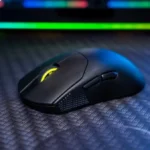
YouTube - Rocket Jump Ninja

YouTube - ShortCircuit

YouTube - BadSeed Tech

YouTube - KitGuruTech
Article Reviews
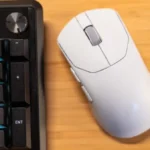
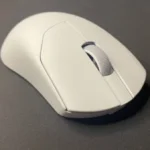
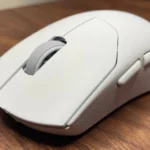
Techpowerup
Best Gaming Mouse
#1
3.7
Choose it for ultra-light FPS play, smooth tracking, and simple remapping. Skip it if you need Bluetooth, stronger battery life, or truly competitive...
Pros: polling rate, weight, FPS gaming suitability, motion consistency, DPI range, sensor performance, Accuracy and tracking precision
Cons: RGB features, Bluetooth support, click latency, cable flexibility, debounce customization, MMO gaming suitability, ecosystem integration