Best for ecosystem integration
Turtle Beach Burst II Air
4.8 feature score
Highest scored product for this feature based on supporting review evidence.
Highest scored product for this feature based on supporting review evidence.
Balances feature score, supporting reviews, and overall product strength.
Has the broadest review evidence for this feature.
Strongest overall product among items with scored evidence for this feature.

Ecosystem integration was praised where HyperSpeed multi-pairing could bind multiple Razer devices to one dongle.
Pros: ecosystem integration, sensor performance
Cons: AI Prompt Master, durability over time

Ecosystem integration evidence was limited but positive, with existing Turtle Beach/ROCCAT settings moving over seamlessly.
Pros: weight, balance and weight distribution
Cons: water and dust resistance, RGB features

Ecosystem integration was strong where mentioned, especially G Hub plus Logitech hardware features that set the mouse apart.
Pros: motion consistency, acceleration control
Cons: cable flexibility, cross-platform compatibility

MSI Center is convenient for users who already manage other MSI components there. Those outside the ecosystem may find the broader application unnecessarily cluttered.
Pros: Accuracy and tracking precision, click latency
Cons: software stability, profile switching

Ecosystem integration was a major highlight, especially around Elgato Stream Deck workflows and Corsair's broader software ecosystem.
Pros: click latency, macro support
Cons: firmware reliability, tilt gesture controls

ROG ecosystem integration was praised because the Omni receiver could connect compatible ROG peripherals together.
Pros: button responsiveness, cable flexibility
Cons: firmware reliability, MMO gaming suitability

Ecosystem integration was praised through Synapse, HyperFlux, and Razer receiver pairing, especially plug-and-play accessory behavior.
Pros: 2.4GHz connectivity, surface compatibility
Cons: click noise, software stability

Ecosystem integration was positive where reviewers paired the Viper with Razer's mouse pad and software ecosystem.
Pros: balance and weight distribution, build quality
Cons: dock compatibility, Bluetooth support

Ecosystem integration was praised for Swarm II acting as one hub for multiple Turtle Beach devices.
Pros: wireless latency, surface compatibility
Cons: RGB features, firmware reliability

Ecosystem integration is positive thanks to the ROG Omni Receiver and SpeedNova compatibility with other ROG peripherals.
Pros: motion consistency, Accuracy and tracking precision
Cons: cable flexibility, palm grip comfort

Ecosystem integration was a strength, with praise for shared receivers, G Hub device management, Lightsync, and Logitech peripheral syncing.
Pros: Accuracy and tracking precision, motion consistency
Cons: handedness options, lift-off distance

Ecosystem integration was praised for Logitech presets, backward compatibility, and community/profile support.
Pros: macro support, fingertip grip comfort
Cons: weight tuning, cable flexibility

Ecosystem integration is positive where reviewers mention PowerPlay, as it can make charging effectively disappear during use.
Pros: left and right click quality, dock compatibility
Cons: Bluetooth support, cross-platform compatibility

Razer ecosystem integration was liked for Chroma synchronization and multi-device setup polish.
Pros: lift-off distance, motion consistency
Cons: cross-platform compatibility, handedness options

Ecosystem integration was positively supported by AIMO/RGB sync evidence for Roccat devices and dock syncing.
Pros: click latency, motion consistency
Cons: firmware reliability, weight tuning

ROG ecosystem integration was praised for syncing the mouse with an ASUS desktop setup.
Pros: premium feel, Accuracy and tracking precision
Cons: software stability, FPS gaming suitability

Ecosystem integration was positive where the mouse was described as an excellent entry point into the ROG ecosystem.
Pros: onboard memory, software stability
Cons: handedness options

Ecosystem integration was praised where reviewers used the Omni receiver or Aura Sync-style setup without delays.
Pros: connection stability, weight
Cons: handedness options, software usability
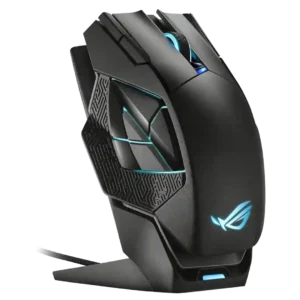
Ecosystem integration was praised through Armoury Crate/Aura-style syncing with other ROG or ASUS products.
Pros: motion consistency, 2.4GHz connectivity
Cons: fingertip grip comfort, cross-platform compatibility
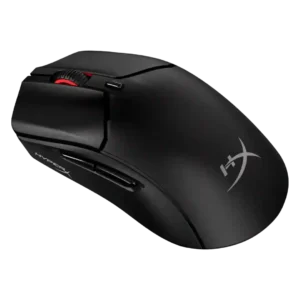
Ecosystem integration had limited but positive support, with one reviewer calling it a great addition to the HyperX ecosystem.
Pros: long-session comfort, balance and weight distribution
Cons: software stability, firmware reliability

Synapse integration was described as seamless in one review, supporting the broader Razer accessory/software ecosystem.
Pros: Accuracy and tracking precision, motion consistency
Cons: click noise, onboard memory

Ecosystem integration was praised in one review for syncing effects across Roccat/Turtle Beach devices.
Pros: left and right click quality, software stability
Cons: polling rate, cross-platform compatibility
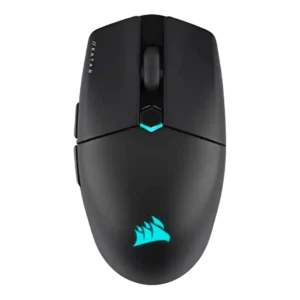
Ecosystem integration was positive for users with Corsair gear, especially iCUE synchronization and multi-device setup.
Pros: software stability, click latency
Cons: MMO gaming suitability, palm grip comfort

Ecosystem integration was a strength for Razer users, with multi-device dongles, Chroma sync, onboard profiles, and Razer accessory compatibility praised.
Pros: motion consistency, sensor performance
Cons: software stability, MMO gaming suitability

Ecosystem integration was positive where discussed, especially GG suite integration and coordinated SteelSeries setup styling.
Pros: click latency, motion consistency
Cons: palm grip comfort, fingertip grip comfort

Ecosystem integration was positively received where reviewers mentioned the Omni receiver and multi-device ASUS setup support.
Pros: cable flexibility, weight
Cons: software stability, handedness options

Ecosystem integration was praised when the G705 could share Aurora/Logitech receivers or pair with another LIGHTSPEED device on one dongle.
Pros: 2.4GHz connectivity, connection stability
Cons: cable flexibility, handedness options

Ecosystem integration had limited positive evidence from simple HyperX ecosystem use and OMEN Instant Pair support.
Pros: motion consistency, wireless latency
Cons: palm grip comfort, software stability

Ecosystem integration has limited positive evidence, with reviewers liking easy lighting sync and Windows dynamic-lighting support.
Pros: acceleration control, dock compatibility
Cons: portability, onboard memory
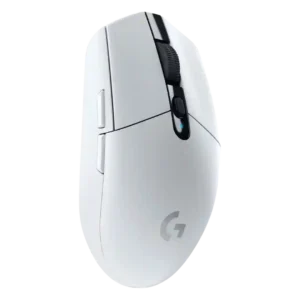
Ecosystem integration was a plus for users in Logitech’s software and keyboard ecosystem, including G-Shift and app integrations.
Pros: motion consistency, wireless latency
Cons: Bluetooth support, acceleration control

Ecosystem integration has limited but positive support, mainly around syncing multiple devices to one dongle.
Pros: long-session comfort, sensor performance
Cons: handedness options, software stability

Ecosystem integration was supported by Corsair lighting-link syncing across multiple Corsair devices.
Pros: handedness options, Accuracy and tracking precision
Cons: tilt gesture controls, software stability
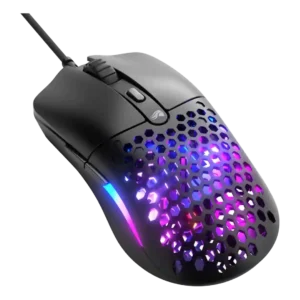
Glorious ecosystem integration was praised as practical for users with several Glorious products thanks to Glorious Core support.
Pros: value for money, click latency
Cons: water and dust resistance, cable flexibility

Ecosystem integration was positive, especially one-receiver pairing, Logitech-device syncing, and reduced cable or USB clutter.
Pros: click latency, motion consistency
Cons: software stability, cross-platform compatibility
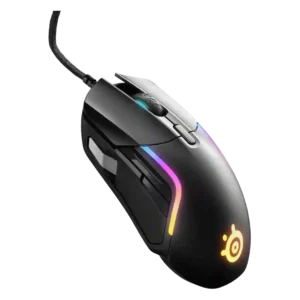
Ecosystem integration was positive but conditional, with reviewers valuing lighting sync and brand-wide software most when already using SteelSeries gear.
Pros: switch durability, surface compatibility
Cons: weight tuning, portability

Ecosystem integration was positive but narrow, focused on HyperSpeed multi-device dongle sharing and saving USB ports.
Pros: motion consistency, wireless latency
Cons: handedness options, onboard memory
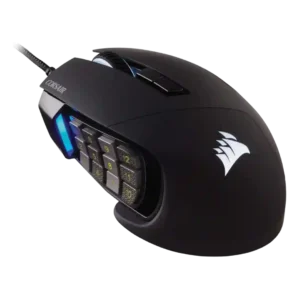
Ecosystem evidence was limited but positive, centered on iCUE syncing the mouse with other Corsair parts.
Pros: button responsiveness, long-session comfort
Cons: handedness options, switch durability

Ecosystem integration evidence was limited but positive where Logitech device lighting sync was demonstrated.
Pros: polling rate, motion consistency
Cons: MOBA gaming suitability, durability over time

Ecosystem integration was supported by TechRadar's positive take on G Hub integration working as intended.
Pros: click latency, onboard memory
Cons: lift-off distance, debounce customization

Ecosystem integration was useful for users already in Razer's Chroma/Synapse setup, especially RGB syncing.
Pros: sensor performance, click latency
Cons: software stability, Bluetooth support

Ecosystem integration was seen as a useful bonus for users already invested in Asus gear, especially shared receiver support.
Pros: Accuracy and tracking precision, sensor performance
Cons: software stability, value for money

Ecosystem integration had limited support, mainly from RGB synchronization with other SteelSeries peripherals.
Pros: motion consistency, surface compatibility
Cons: onboard memory, handedness options

SteelSeries GG and Prism integration was treated as a useful bonus for adding personal RGB and settings touches.
Pros: connection stability, left and right click quality
Cons: palm grip comfort, profile switching

One reviewer called it a strong option for users already invested in SteelSeries gear and software.
Pros: build quality, ergonomic design
Cons: handedness options, RGB features

Ecosystem integration is modestly positive for users already invested in iCUE or Corsair wireless devices.
Pros: click latency, fingertip grip comfort
Cons: firmware reliability, skate durability

Ecosystem integration was mixed but present, with Armoury Crate centralizing ASUS devices while feeling overloaded for mouse-only use.
Pros: motion consistency, surface compatibility
Cons: handedness options, software stability

Ecosystem integration was mixed: one reviewer liked CAM’s NZXT-product menu, while another disliked the bloat for users without other NZXT gear.
Pros: FPS gaming suitability, weight
Cons: fingertip grip comfort, handedness options
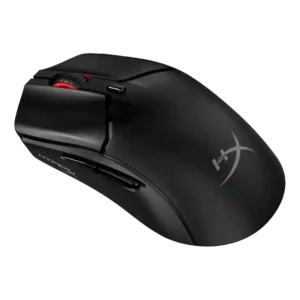
Ecosystem integration was limited by confusing control between mouse settings and HyperX light sync.
Pros: cable flexibility, connection stability
Cons: motion consistency, software stability

Ecosystem integration was mixed because HyperPolling dongle compatibility and naming created confusion or fragmentation across Razer mice.
Pros: click latency, motion consistency
Cons: handedness options, Bluetooth support

Ecosystem integration was limited by missing game-recognition profile behavior in the software.
Pros: battery life, programmable buttons
Cons: software stability, firmware reliability