#1

The 8K wireless polling rate impressed reviewers for speed and smoothness, though several called it overkill or battery-hungry outside competitive play.
Pros: motion consistency, acceleration control
Cons: cable flexibility, cross-platform compatibility
#2

Reviewers liked the high polling-rate capability and fast response, with one caveat that observed polling could drop under slower movement without causing in-game issues.
Pros: FPS gaming suitability, weight
Cons: fingertip grip comfort, handedness options
#3

Polling-rate evidence was positive where mentioned, with reviewers calling the 1,000Hz rate responsive or stable.
Pros: drag click support, claw grip comfort
Cons: handedness options, Bluetooth support
#4

Polling rate support was widely praised, especially 4K wireless and included booster access, with some debate over 8K usefulness.
Pros: connection stability, weight
Cons: handedness options, software usability
#5

Polling-rate evidence is positive overall: 1000Hz is praised as high performance, while Bluetooth polling is described as lower but still usable.
Pros: motion consistency, Accuracy and tracking precision
Cons: cable flexibility, palm grip comfort
#6
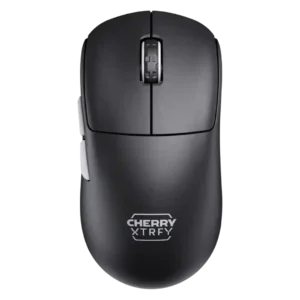
The 8K polling rate impressed some reviewers with smooth responsiveness, while others found little detectable difference and noted battery tradeoffs.
Pros: 2.4GHz connectivity, long-session comfort
Cons: programmable buttons, button customization
#7
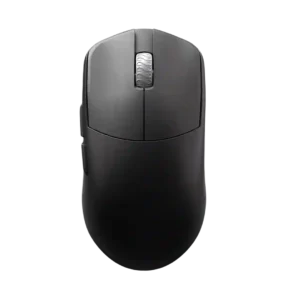
Polling-rate support is valued, especially 8K wireless, though reviewers note 8K may not be useful to everyone and can trade off against battery life.
Pros: DPI range, balance and weight distribution
Cons: charging convenience, click noise
#8

Polling rate was a headline strength, but reviewers often questioned the practical value of 8K versus its battery cost.
Pros: Accuracy and tracking precision, sensor performance
Cons: software stability, value for money
#9
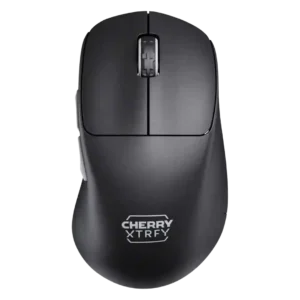
The polling rate was generally seen as responsive and smooth, though IGN found the jump beyond 1000Hz hard to notice and tied it to battery drain.
Pros: 2.4GHz connectivity, long-session comfort
Cons: debounce customization, fingertip grip comfort
#10

Polling-rate evidence was mixed-positive: 1,000Hz was widely considered enough, while the separate HyperPolling dongle was a repeated caveat.
Pros: click latency, motion consistency
Cons: handedness options, Bluetooth support
#11

Polling rate feedback was mixed: high rates were valued, but accessories and battery penalties limited their practical appeal.
Pros: lift-off distance, motion consistency
Cons: cross-platform compatibility, handedness options
#12

Polling rate was viewed as adequate for most gamers, but several reviewers criticized it for lagging behind 4,000Hz and 8,000Hz rivals.
Pros: handedness options, Accuracy and tracking precision
Cons: tilt gesture controls, software stability
#13

Polling feedback was mixed: 1000Hz was acceptable for many, but reviewers disliked needing a separate booster for easy 8000Hz.
Pros: cable flexibility, weight
Cons: software stability, handedness options
#14
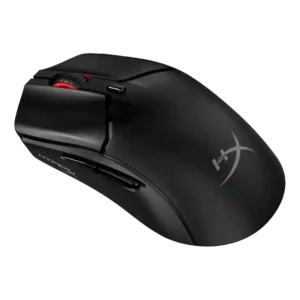
The 1,000Hz polling rate was acceptable for value-focused play, but a limitation for esports-grade expectations.
Pros: cable flexibility, connection stability
Cons: motion consistency, software stability
#15

Polling-rate feedback was mixed: one review liked the easy adjustment up to 1000Hz, while another found 1000Hz less compelling for very high-refresh displays.
Pros: click latency, motion consistency
Cons: handedness options, portability
#16

The 8K polling capability impressed reviewers technically, but many found its real-world benefit subtle, hardware-dependent, or not worth constant use.
Pros: click latency, balance and weight distribution
Cons: 2.4GHz connectivity, software stability
#17

Polling rate drew mixed reactions: 1,000Hz was treated as standard and adequate by some, while several reviewers noted it trails higher-end competitive mice.
Pros: click latency, onboard memory
Cons: lift-off distance, debounce customization
#18

Polling rate was the clearest performance limitation: some reviewers accepted the 1,000Hz cap, but many called it a drawback versus higher-end gaming mice.
Pros: weight, balance and weight distribution
Cons: water and dust resistance, RGB features
#19

Polling rate drew criticism: multiple reviewers noted the 1000Hz ceiling or inconsistency as a weak point versus higher-end competitive mice.
Pros: left and right click quality, software stability
Cons: polling rate, cross-platform compatibility
#20

Polling rate drew criticism: reviewers said the 1000 Hz limit trails newer high-polling competitors and feels odd for the price.
Pros: palm grip comfort, handedness options
Cons: Bluetooth support, MMO gaming suitability