Review: LAMZU Maya X

Updated: 11 hours ago
4.3
Based on methodology below
209
Insights analyzed
52
Grouped by key features
10
From expert reviews
Scores below reflect consolidated expert coverage across these features.
Bottom Line

Choose the LAMZU Maya X for a very light, precise claw-grip wireless mouse. Skip it if stiff side buttons or faster battery drain at high polling will bother you.

Best for

Best for competitive FPS players and medium-to-large-hand users who want a very light symmetrical mouse for claw or relaxed claw grip, with strong sensor performance and excellent stock skates.

Not for

Not for buyers who depend heavily on soft, easy side buttons, want Bluetooth or dock support, or need long battery life while using high polling rates.

Verdict

The LAMZU Maya X stands out as a lightweight, high-performance wireless mouse built around a comfortable larger Maya shape, strong PAW3950 sensor results, and consistently praised stock skates. Its best fit is competitive play where low weight, fast clicks, and 8K polling matter, especially for claw or relaxed claw grip users. The main tradeoff is refinement around the edges: battery life drops quickly at higher polling rates, the included cable is not ideal for wired charging, and side-button feel varies from crisp to stiff depending on the unit. The software story is also mixed, with web controls praised but app performance criticized in one review. Overall, the reviews point to a premium-feeling, performance-first mouse with a few practical annoyances rather than core performance flaws.

What Reviewers Agree On

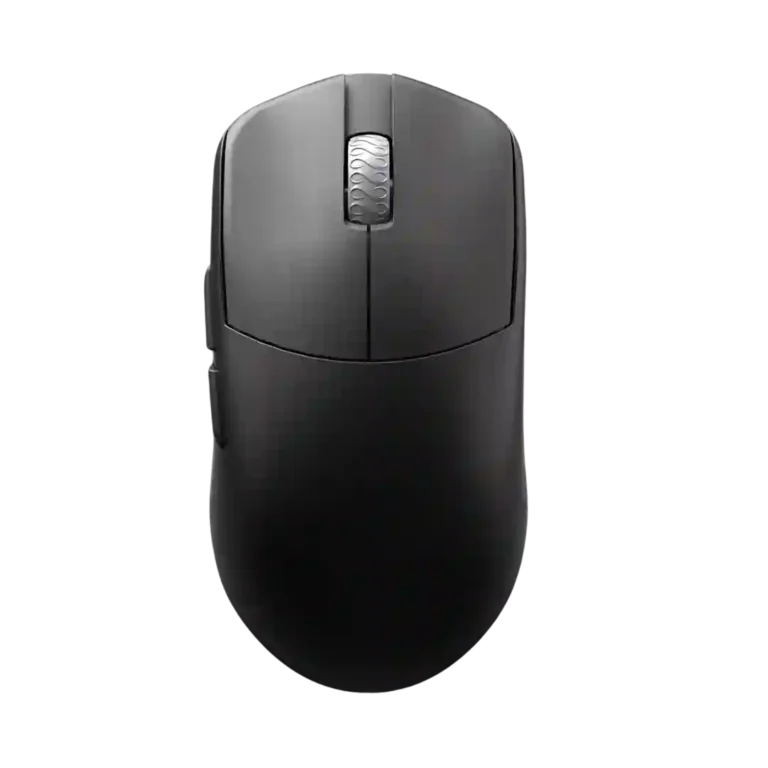
Across the reviews, the LAMZU Maya X is strongest where competitive mouse buyers usually care most: weight, sensor performance, shape, and glide. Reviewers repeatedly describe the 47-48 g shell as impressively light for its size, while the PAW/PixArt 3950 implementation is tied to precise tracking, no obvious anomalies, and strong wireless performance. The stock skates also receive unusually consistent praise, with multiple reviewers saying they are smooth, fast, compatible with different pads, and not something they would immediately replace.

The shape earns broad approval, especially for claw and relaxed claw users with medium-to-large hands. Several reviewers compare it to popular symmetrical options but describe the Maya X as more shaped or more locked-in than a plain neutral shell. Palm and fingertip comfort are more conditional: some users can palm it comfortably, but reviewers with larger hands or very fingertip-focused preferences sometimes point to other shapes or the smaller Maya instead. The coating is mostly grippy and improved, though black copies can show oils and some reviewers mention moisture pickup or possible cleaning concerns.

The biggest tradeoff is that the feature set is more performance-focused than carefree. The 8K receiver, polling options, web controls, macros, debounce adjustment, and low LOD settings make the mouse flexible, but battery life declines quickly at higher polling rates. Side buttons are also the least consistent part of the hardware, with comments ranging from crisp and accessible to stiff or mushy. Buyers who prioritize main clicks, sensor feel, glide, and low weight are most likely to be satisfied; buyers who rely heavily on side buttons or want maximum battery endurance may notice the compromises first.

Pros

  • 5.0
    based on 1 review
    click latency: 5.0, based on 1 review
    The click-latency evidence comes from Nookyyy's specification section, which lists 0 ms click latency. Other reviews also describe the clicks as fast and responsive, but only Nookyyy provides a direct value.
  • 4.8
    based on 5 reviews
    weight: 4.8, based on 5 reviews
    Weight is a major strength. Multiple reviewers measured or cited roughly 47-48 g and described the weight as excellent, amazing, or impressive for the larger shell.
  • 4.8
    based on 4 reviews
    Accuracy and tracking precision: 4.8, based on 4 reviews
    Tracking precision is described as excellent across several reviews: ProSettings saw no anomalies at 8000 Hz, Tom's Guide found movements predictable and stable, Nookyyy cited superior tracking performance, and Wasabi reported consistently good tracking on mouse pads.
  • 4.7
    based on 7 reviews
    polling rate: 4.7, based on 7 reviews
    Polling-rate support is a standout feature. Every major source that discussed specs points to 8K wireless polling or broad polling-rate options, often with the 8K receiver included.
  • 4.7
    based on 6 reviews
    sensor performance: 4.7, based on 6 reviews
    Sensor performance is consistently praised. Reviews identify the PAW/PixArt 3950 and describe stellar performance, superior tracking, perfect operation, or elite wireless sensor implementation.
  • 4.7
    based on 9 reviews
    glide smoothness: 4.7, based on 9 reviews
    Glide smoothness is a consistent highlight. Reviewers repeatedly praise the stock feet as smooth, fast, low-friction, or among the best they have tried, with no need to replace them immediately.
  • 4.7
    based on 4 reviews
    wireless performance: 4.7, based on 4 reviews
    Wireless performance is consistently strong. Reviewers describe true 8K wireless operation, elite wireless implementation, and wireless performance that feels great or among the best.
  • 4.7
    based on 6 reviews
    left and right click quality: 4.7, based on 6 reviews
    Main-click quality is repeatedly praised. Reviews describe the main clicks as implemented well, responsive, crisp, loved, or superior to competing clicks.
  • 4.7
    based on 7 reviews
    button responsiveness: 4.7, based on 7 reviews
    Button responsiveness is a major positive. Reviewers repeatedly describe the clicks as light, spammable, fast, responsive, or precise, although one review felt its particular switch implementation lacked character.
  • 4.7
    based on 5 reviews
    claw grip comfort: 4.7, based on 5 reviews
    Claw grip support is one of the clearest strengths. Multiple reviewers with claw or aggressive claw grips found the shape comfortable, controlled, and well suited to relaxed or regular claw positions.
  • 4.7
    based on 4 reviews
    motion consistency: 4.7, based on 4 reviews
    Motion consistency is a strength in testing and configuration. Reviews cite no anomalies at 8000 Hz, stable predictable movement, motion-sync controls, and strong sensor consistency.
  • 4.7
    based on 2 reviews
    wireless latency: 4.7, based on 2 reviews
    Wireless latency is supported indirectly through click-latency, high polling, and responsiveness evidence. Reviews describe lightning-fast response and responsive button behavior in wireless/high-performance contexts.
  • 4.6
    based on 7 reviews
    shape comfort: 4.6, based on 7 reviews
    Shape comfort is a core strength. Most reviewers liked the larger Maya X shape, especially for medium-to-large hands and claw or relaxed claw grip, though a few preferred the smaller Maya or noted edge/size preferences.
  • 4.6
    based on 3 reviews
    DPI range: 4.6, based on 3 reviews
    DPI range is strong on paper and configurable in software. Reviews identify the PAW3950/30,000 CPI or 30,000 DPI capability and mention DPI adjustment in the web interface.
  • 4.6
    based on 4 reviews
    balance and weight distribution: 4.6, based on 4 reviews
    The weight and shape are repeatedly described as controlled and stable. ProSettings praised the pinched middle for finer control, Boardzy called the weight balance on point, Wasabi found it planted and stable, and another reviewer felt locked in immediately.
  • 4.6
    based on 4 reviews
    surface compatibility: 4.6, based on 4 reviews
    Surface compatibility is strong. Reviewers mention use across a variety of surfaces, any mouse pad, textured pads, and consistent tracking on mouse pads.
  • 4.6
    based on 2 reviews
    connection stability: 4.6, based on 2 reviews
    Connection stability is supported mainly by performance testing language. ProSettings saw no anomalies even at 8000 Hz, and Wasabi reported the sensor/wireless use working properly during review.
  • 4.6
    based on 2 reviews
    skate durability: 4.6, based on 2 reviews
    Skate durability has moderate support. Reviews mention spare feet for wear, smoothness after nearly four weeks, and stock skates that remained worth keeping, but there is no long-term months-long test.
  • 4.6
    based on 1 review
    MOBA gaming suitability: 4.6, based on 1 review
    MOBA suitability is supported by Tom's Guide testing in League of Legends, where the reviewer said the mouse worked very well in ranked matches.
  • 4.6
    based on 1 review
    switch durability: 4.6, based on 1 review
    Switch durability is supported by the Omron optical switch rating evidence. Direct long-term switch testing is not provided, but the quoted rating is high.
  • 4.5
    based on 9 reviews
    build quality: 4.5, based on 9 reviews
    Build quality is generally strong, with several reviews calling the shell rigid, solid, or premium. One YouTube review reported a small side creak, so the overall picture is high quality with a possible unit-level QC caveat.
  • 4.5
    based on 4 reviews
    lift-off distance: 4.5, based on 4 reviews
    Lift-off distance is configurable and competitive. Reviews cite 0.7 mm support, LOD adjustment in software, and multiple lift-off options.
  • 4.5
    based on 5 reviews
    ergonomic design: 4.5, based on 5 reviews
    Ergonomics are praised across grip styles. Reviewers describe a comfortable symmetrical design, support for different grips, hand-rest comfort, and finger placement that helps the mouse feel controlled.
  • 4.5
    based on 5 reviews
    scroll wheel quality: 4.5, based on 5 reviews
    Scroll-wheel quality is generally good. Reviewers describe it as tensioned correctly, light, tactile, distinct, and easy to click, with one dust/open-bottom caveat in ProSettings.
  • 4.5
    based on 7 reviews
    switch feel: 4.5, based on 7 reviews
    Switch feel is widely praised. Most reviewers describe the Omron optical switches as crispy, springy, light, fast, or precise, although one reviewer found the feel somewhat lackluster.
  • 4.5
    based on 3 reviews
    debounce customization: 4.5, based on 3 reviews
    Debounce customization is well supported through the configuration tools. Reviewers mention adjustable debounce time, and one software walkthrough shows debounce time set to 0 ms by default.
  • 4.5
    based on 3 reviews
    macro support: 4.5, based on 3 reviews
    Macro support is supported in the software. ProSettings, Tom's Guide, and another software walkthrough mention macro recording or macro controls.
  • 4.5
    based on 2 reviews
    firmware reliability: 4.5, based on 2 reviews
    Firmware reliability is positive in the limited evidence available. Hard-Gamer notes firmware updates are handled online, and another reviewer says an early battery-indicator issue was quickly fixed by firmware.
  • 4.5
    based on 2 reviews
    programmable buttons: 4.5, based on 2 reviews
    Programmable buttons are supported through software. Reviews mention full rebinding and six programmable buttons, including the main buttons, wheel click, side buttons, and DPI button.
  • 4.5
    based on 1 review
    2.4GHz connectivity: 4.5, based on 1 review
    Direct connection evidence is limited, but the Nookyyy transcript states that the mouse can run over wired USB or wireless 2.4GHz. No reviewer raised a specific 2.4GHz reliability complaint.
  • 4.5
    based on 3 reviews
    FPS gaming suitability: 4.5, based on 3 reviews
    FPS suitability is strong. Reviews discuss Valorant, Fortnite, competitive gaming, and aim-trainer performance, with the mouse's low weight, responsive clicks, and high polling rate supporting competitive play.
  • 4.4
    based on 3 reviews
    button customization: 4.4, based on 3 reviews
    Button customization is supported through the software/web interface. Reviews mention online button configuration, full key rebinding, bottom DPI-button programmability, and button mapping.
  • 4.4
    based on 6 reviews
    premium feel: 4.4, based on 6 reviews
    Premium feel is mostly positive. Reviews call the unboxing premium, the mouse premium-feeling, exceptional, or close to its price in perceived quality.
  • 4.4
    based on 7 reviews
    value for money: 4.4, based on 7 reviews
    Value is rated positively at around $120. Reviewers cite strong specs, included accessories, competitive pricing versus big-brand alternatives, and a premium package, while noting cheaper budget mice exist.
  • 4.3
    based on 2 reviews
    long-session comfort: 4.3, based on 2 reviews
    Long-session evidence is positive but indirect. Nookyyy emphasizes extended gaming sessions through battery life, while Wasabi calls the mouse comfortable as a daily driver for general computer use.
  • 4.2
    based on 7 reviews
    grip texture: 4.2, based on 7 reviews
    Grip texture is generally good but not perfect. Several reviewers call the coating grippy or improved, while others mention moisture pickup, smudges, or possible wear/cleaning challenges for sweaty users.
  • 4.2
    based on 4 reviews
    materials quality: 4.2, based on 4 reviews
    Materials quality is generally good. Reviewers point to pure PTFE feet, a good-feeling plastic case, strong shell materials, and thickness that contributes to solidity.
  • 4.2
    based on 4 reviews
    durability over time: 4.2, based on 4 reviews
    Durability evidence is favorable but not long-term definitive. Reviews cite durable design, strong build, no decay after weeks of use, and one reviewer felt it would hold out longer; one coating-wear caveat remains.
  • 4.1
    based on 3 reviews
    portability: 4.1, based on 3 reviews
    Portability is supported by the low weight and included pouch/spare-feet package. The mouse is easy to carry, though the evidence is more about accessories than travel testing.
  • 4.1
    based on 7 reviews
    software usability: 4.1, based on 7 reviews
    Software usability varies by implementation. Web-based setup is praised for convenience and simplicity, but Tom's Guide criticized the companion app as slow, laggy, and ugly.
  • 3.9
    based on 4 reviews
    software stability: 3.9, based on 4 reviews
    Software stability is mixed. ProSettings and Wasabi found it working or loading fine, while Tom's Guide had slow, laggy app trouble and another review simply said the web driver gets the job done.
  • 3.9
    based on 3 reviews
    handedness options: 3.9, based on 3 reviews
    Handedness evidence describes an ambidextrous or symmetrical shape, though one source calls it right-handed symmetrical. The score reflects a broadly symmetrical shape rather than true left-side-button parity.
  • 3.9
    based on 1 review
    cross-platform compatibility: 3.9, based on 1 review
    Cross-platform support is partial. Nookyyy says the mouse works with most USB 2.0-and-newer systems, but also notes that customization is not yet supported on macOS.
  • 3.8
    based on 1 review
    onboard memory: 3.8, based on 1 review
    Onboard memory evidence is limited to the transcript's MCU/profile discussion. It supports stored profiles and CPI settings, but reviews do not deeply test onboard storage behavior.
  • 3.8
    based on 1 review
    profile switching: 3.8, based on 1 review
    Profile switching is only lightly supported by review text. The strongest direct evidence is the web-software mention of setting up profiles; deeper profile-switching behavior is not tested.
  • 3.8
    based on 8 reviews
    battery life: 3.8, based on 8 reviews
    Battery life is a mixed strength. Reviewers cite up to roughly 70-80 hours around 1K polling, but several note that higher polling rates drain the mouse faster and can require charging every few days.
  • 3.5
    based on 3 reviews
    palm grip comfort: 3.5, based on 3 reviews
    Palm grip comfort is mixed by hand size and preference. One reviewer says palm grip feels good on the larger Maya X, while others recommend different options for users wanting a very full palm or using larger hands.

Cons

  • 3.4
    based on 6 reviews
    side button quality: 3.4, based on 6 reviews
    Side-button quality is the most uneven button area. Some reviewers found them crisp and accessible, but several reported stiffness, mushiness, or excess travel, especially on the top/front side button.
  • 3.3
    based on 3 reviews
    fingertip grip comfort: 3.3, based on 3 reviews
    Fingertip grip is only conditionally recommended. Several reviewers suggest the smaller Maya or another large-fingertip option unless the user has medium-to-large hands or specifically wants a larger mouse.
  • 3.2
    based on 3 reviews
    charging convenience: 3.2, based on 3 reviews
    Charging convenience is mixed. The mouse can be used while plugged in and one reviewer liked the larger USB-C port fit, but Tom's Guide found the charging cable awkward and another reviewer avoided it because of stiffness.
  • 3.2
    based on 2 reviews
    click noise: 3.2, based on 2 reviews
    Noise evidence is limited and mixed. ProSettings said the wheel gets louder when scrolling quickly, while another reviewer found the side-click sound loud and unpleasant.
  • 2.6
    based on 3 reviews
    cable flexibility: 2.6, based on 3 reviews
    Cable flexibility is a weak point. Tom's Guide and multiple YouTube reviews describe the included USB-C cable as stiff or draggy enough to interfere with wired use.

FAQ

Is the LAMZU Maya X worth buying?

Yes, if you want a lightweight high-performance wireless mouse with strong tracking, praised stock skates, and a comfortable claw-friendly shape. The value looks especially good against more expensive esports mice, though cheaper options exist.

Who is the LAMZU Maya X best for?

It is best for claw and relaxed claw grip users, especially with medium-to-large hands. Reviewers also describe it as a strong competitive gaming option thanks to its low weight, responsive clicks, and 8K polling support.

What is the main drawback of the LAMZU Maya X?

The side buttons are the most common hardware complaint, with several reviewers calling them stiff, mushy, or only okay. Battery life also drops quickly when using higher polling rates.

How good is the sensor performance?

Sensor performance is one of the strongest areas. Reviews cite the PAW/PixArt 3950, stable tracking, no anomalies at 8000 Hz, and strong wireless implementation.

Is the LAMZU Maya X good for palm grip?

Palm grip comfort depends on hand size and how much palm fill you want. One reviewer found palm grip comfortable on the larger shell, while others suggested different options for larger hands or users who want a very filled palm.

Does the LAMZU Maya X have good software?

The software feedback is mixed. Web-based controls are praised for convenience and simple access to settings such as polling, DPI, debounce, LOD, and macros, but one companion-app review reported slow, laggy performance.

How is the battery life?

At around 1K polling, reviews cite roughly 70-80 hours. At higher polling rates such as 2K, 4K, or 8K, battery life falls much faster and may require charging every few days depending on use.

Reviews we analyzed

Video Reviews

Article Reviews

#1
4.4
Choose the Harpe II Ace for ultralight FPS control, 8K wireless, and easy web setup. Skip it if you need many buttons or...
Pros: polling rate, weight, wireless performance, DPI range, switch durability, sensor performance, motion consistency
Cons: onboard memory, MMO gaming suitability, software stability, profile switching
#2
4.4
Choose it if you want a compact, comfortable work-and-play mouse with strong wireless options and battery life. Skip it if you want true...
Pros: switch durability, wireless performance, wireless latency, ecosystem integration, glide smoothness, Accuracy and tracking precision, DPI range
Cons: click noise, RGB features
#3
4.3
Choose the LAMZU Maya X for a very light, precise claw-grip wireless mouse. Skip it if stiff side buttons or faster battery drain...
Pros: click latency, weight, Accuracy and tracking precision, sensor performance, polling rate, wireless performance, glide smoothness
Cons: cable flexibility, click noise, charging convenience, fingertip grip comfort, side button quality
#4
4.3
Choose the ASUS ROG Harpe Ace Mini for ultra-light, accurate esports play in a compact shape. Skip it if you need larger-hand palm...
Pros: weight, sensor performance, DPI range, battery life, switch durability, FPS gaming suitability, connection stability
Cons: software stability, debounce customization, handedness options