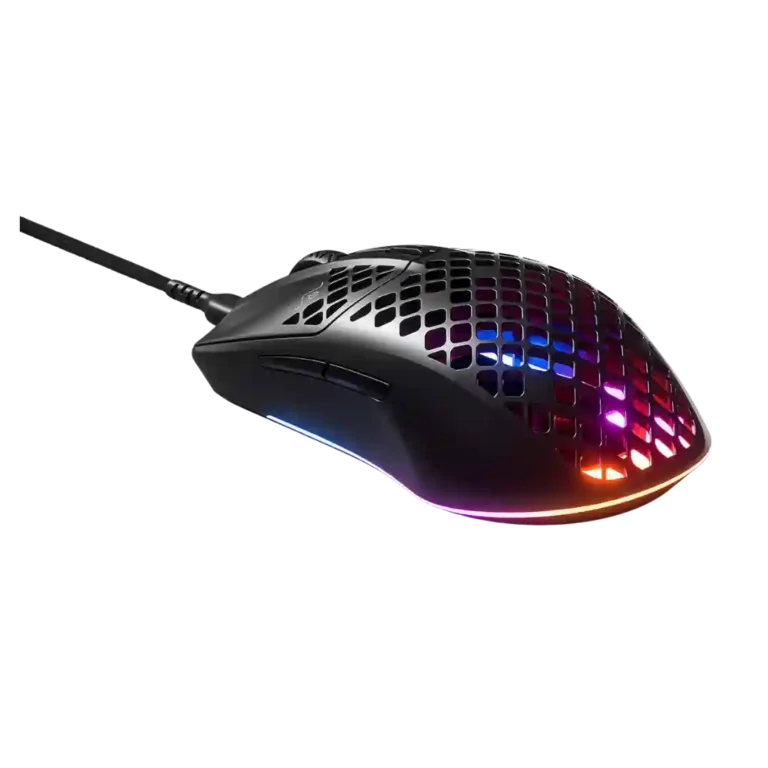
SteelSeries Aerox 3 Review
Bottom Line
Choose the SteelSeries Aerox 3 if you want an ultra-light mouse with easy glide, bold RGB, and claw/fingertip comfort. Skip it if cable quality, build rigidity, or high lift-off concerns matter more.
Best for right-handed claw or fingertip users who want a very light mouse with smooth glide, visible RGB, and a fast everyday gaming feel. It is also better suited to buyers who like the Aerox/Rival-style shape and can tolerate or replace the stock cable.
Not for palm-grip users, left-handed users, or buyers who are sensitive to cable drag, high lift-off distance, button wobble, or shell flex. It is also a weaker fit for shoppers expecting the wired model to clearly outperform similarly priced lightweight competitors.
Across the reviews, the Aerox 3 comes across as a lightweight gaming mouse with strong upside but uneven execution. Its best moments are its 57-59 gram body, smooth glide, responsive feel, bright RGB, and comfortable claw or fingertip shape. The tradeoff is that the wired version draws repeated criticism for its stock cable, value, and in some reviews, build flex, primary-button wobble, or lift-off behavior. Written reviews are more favorable, while several video reviewers are much harsher at the $60 price point. The result is a mouse that can feel fast and comfortable when the shape fits, but it is less safe for buyers who are sensitive to cable drag, sensor placement, or small build-quality flaws.
What Reviewers Agree On
The strongest through-line is that the Aerox 3 is built around lightness, speed, and a distinctive open-shell look. Multiple reviewers point to the 57-59 gram weight, smooth glide, RGB lighting, and comfortable claw or fingertip-friendly shape as the reasons the mouse feels quick and fun to use. Positive reviews also describe precise or responsive tracking, good everyday comfort, and useful SteelSeries customization through Engine or GG. The written reviews especially frame it as a capable gaming mouse that keeps fatigue low and moves easily across surfaces.
The more critical reviews focus on execution rather than the core idea. Several reviewers dislike the wired cable, calling it stiff, heavy, basic, or not flexible enough. Build quality is also disputed: some reviews call the mouse durable or solid, while others report creaking, flex, button wobble, or a weaker structure from the bottom cutouts. Sensor feedback is similarly split. Some users report spot-on performance or no lift-off issue, but others criticize high lift-off distance, sensor placement, undershooting, or inconsistent movement during fast aiming.
The biggest buying tradeoff is price versus tolerance for flaws. At sale pricing, one review calls it a great value, and another says the European prices are acceptable. At around $60, multiple video reviewers argue that competing lightweight mice offer better cables, sensors, feet, or build quality. The most satisfied buyer is likely someone who values a very light right-handed mouse, likes the Aerox/Rival-style shape, uses claw or fingertip grip, and will not be bothered by a replaceable but divisive cable. Buyers who palm grip, demand low lift-off distance, or expect premium wired-mouse value out of the box may be less satisfied.
Scored Features
Pros
-
2.4GHz connectivity is supported in the combined wired/wireless review through the included dongle and 2.4 GHz connection wording.
-
Battery life is supported in the combined wired/wireless review, which reports 200 hours over Bluetooth and 80 hours over wireless connection.
-
Bluetooth support is supported in the combined wired/wireless review, which explicitly mentions Bluetooth 5.0 and its efficiency role.
-
Charging convenience is supported in the combined wired/wireless review, which says 15 minutes of charging provides 40 hours of gaming.
-
Switch durability is supported by two reviews that cite an 80 million click rating for the SteelSeries mechanical switches.
-
Weight is a strong point across reviews. Multiple reviewers cite 57 to 59 grams for the wired model or 66 grams for wireless, and the low weight is treated as central to the mouse experience.
-
Connection stability is positive in the available evidence: one review cites latency-free gaming, and another says the wired connection never disconnected during quick movement.
-
Acceleration control is supported by one review through explicit no-hardware-acceleration wording, indicating unaccelerated tracking behavior.
-
Programmable-button evidence is limited to one review that states the mouse has six programmable buttons.
-
Wireless latency is supported only in the combined wired/wireless review, which describes lossless and latency-free gaming.
-
Wireless performance is supported only in the review that covers the Wireless version, where the reviewer says the user does not have to rely on a cable.
-
Durability over time is supported by an 80 million click rating and by one review saying the mouse continued to prove valuable after release.
-
Macro support is supported by two reviews that mention programming macros or changing macros in the customization suite.
-
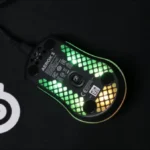
RGB is consistently visible and often praised. Multiple reviews highlight RGB zones, strong lighting, bright colors, or attractive aesthetics, though one review finds lighting setup fiddly and another reports saved RGB settings reverting.
-
FPS suitability is generally positive when tracking behaves well, with reviews citing shooters, fast games, and first-person shooter movements, though the broader sensor evidence creates caveats for sensitive FPS players.
-
Materials quality is mostly positive where mentioned, with reviewers citing matte ABS, high-quality components, or a nice matte finish.
-
Long-session comfort is generally positive where discussed, with evidence of reduced fatigue, two weeks of use, no RSI, and an almost weightless feel.
-
Shape comfort is generally positive for the intended grip styles. Reviewers repeatedly describe the shape as comfortable, suitable for claw or fingertip, or personally likable, while palm grip remains a separate limitation.
-
Review evidence highlights IP54-style water and dust protection in two positive reviews, while one later review warns that the open honeycomb shell can still let dust and dirt inside and may need cleaning.
-
Ecosystem integration is supported by SteelSeries GG, Engine, and the SteelSeries customization suite, though related software usability is not uniformly praised.
-
Fingertip grip comfort is generally positive, with several reviews explicitly saying fingertip grip is suitable or fine.
-
Glide is generally strong but not unanimous. Several reviews praise smooth PTFE movement or excellent glide, while critical reviews find the feet merely okay or prone to snagging.
-
Ergonomic comfort is generally good for the intended hand and grip style, though support is shaped by the right-handed design and the small/lightweight body.
-
Button customization is supported by software customization evidence, including individual button-function configuration and DPI or macro adjustment through SteelSeries software.
-
DPI/CPI coverage is directly supported by three reviews: the wired model is described around 8,000 to 8,500 CPI/DPI, with one review noting 100 CPI increments.
-
Claw grip comfort is generally positive, with reviews repeatedly saying the shape or grip style works for claw users.
-
Button responsiveness is supported mainly by general responsiveness and by one review saying the scroll wheel and side buttons had no performance issues.
-
Polling-rate evidence appears in one review, which lists a thousand hertz and one millisecond as the specification.
-
Portability is supported in one review by the detachable cable being useful for travel or laptop use.
-
Tracking accuracy is one of the most split areas. Several reviews describe the Aerox 3 as precise, responsive, spot-on, or working well, while two critical reviews cite undershooting, lift-off behavior, and sensor issues that hurt aiming consistency.
-
Surface compatibility is mostly positive in written and consumer-style reviews, with one review saying it worked on varied surfaces, but one critical review says the lift-off problem remained across surfaces.
-
Scroll wheel quality trends acceptable to good. Reviews describe it as feeling good, fine, okay, or giving notch feedback.
-
Click noise is acceptable in the available evidence: one review says the clicks are not as loud as another SteelSeries mouse, and another says the click sound was not too bad.
-
Grip texture receives mixed evidence: one reviewer praises the coating, another likes the matte texture, while another says side gripping can feel slippery.
-
Sensor performance ranges from strong to poor depending on the reviewer. Written and some video reviews describe responsive tracking and no performance issue, but two video reviews criticize the TrueMove Core implementation, sensor placement, or lift-off behavior.
-
Switch feel is moderately positive overall. One review praises satisfying clicks, while another says the clicks were not too bad despite other click-quality complaints.
-
Motion consistency is mixed. Positive reviews cite latency-free movement, 1-to-1 tracking, and perfect performance, while negative reviews describe cursed jiggle, undershooting, and shot-disrupting movement.
-
Build quality is one of the most divisive attributes. Positive reviews call it durable or high quality, but critical videos cite creaking, flex, wobble, and structural concerns from the extensive cutouts.
Cons
-
Premium feel is split between a review that says the mouse feels fantastic and a critical review that expected the out-of-box quality to be better.
-
Value for money is highly split. Positive reviews call the sale price a great value or acceptable, while several video reviews argue the wired model is hard to recommend or not worth the asking price.
-
Side button quality is mixed. One reviewer found them small and sharp, another found them fine, another had misclicks, and another praised their comfortable placement.
-
Software usability is mixed. Some evidence praises SteelSeries Engine, but other reviews describe awkward use, RGB reverting, and missing lift-off-distance adjustment.
-
Lift-off distance is sharply divided. One reviewer noticed no lift-off issues, another did not find a tracking issue, while two others called lift-off distance a major problem and said it could disrupt aiming.
-
Skate durability is a caution in one review, which notes the feet may wear more quickly on very rough surfaces.
-
Cable flexibility is a major tradeoff. One review praises the detachable cable's flexibility, but several video reviewers call it heavy, stiff, basic, wack, or not flexible enough.
-
Handedness is limited. The evidence points to a right-handed design rather than ambidextrous or left-handed options.
-
Software stability is a weakness in one review, which reports occasional stability problems.
-
Palm grip comfort is a poor fit in the video reviews. Reviewers say palm grip is not really possible or not recommended, especially for larger hands.
-
Firmware reliability is a weakness in one review, where saved RGB behavior did not remain as expected after closing software.
-
Onboard memory is a negative point in one review, where saved RGB behavior did not remain on the device after closing the software.
-
Left and right click quality is a weakness in the critical video reviews, which cite wiggle and wobble in the primary buttons.
FAQ
Is the SteelSeries Aerox 3 worth buying?
It can be worth buying if the price is low and you want a very light, RGB-heavy mouse for claw or fingertip grip. The reviews are divided at around $60 because several reviewers think the cable, sensor behavior, or build quality trail competing lightweight mice.
Who is the SteelSeries Aerox 3 best for?
It is best for right-handed users who prefer claw or fingertip grip and want low weight, smooth glide, and a lively RGB design. Reviewers were less positive about palm grip, especially for larger hands.
What is the main drawback of the SteelSeries Aerox 3?
The stock cable and value are the most repeated complaints in the wired reviews. Some reviewers also reported build flex, primary-click wobble, or lift-off-distance problems.
Is the SteelSeries Aerox 3 good for FPS games?
Some reviewers found it fast, precise, and suitable for shooters, while others said sensor placement or high lift-off distance hurt fast aiming. It is a better FPS fit for users who adapt well to the shape and are not sensitive to lift-off behavior.
Is the SteelSeries Aerox 3 comfortable for palm grip?
The review evidence is not favorable for palm grip. Video reviewers specifically said palm grip was difficult or not recommended, while claw and fingertip grips were described much more positively.
How good is the Aerox 3 cable?
Cable feedback is mixed but leans negative in the video reviews. One written review praises the cable's flexibility, but several video reviewers call it stiff, heavy, basic, or worth replacing.
Does the Aerox 3 have good software customization?
It has useful customization for DPI, RGB, macros, and button functions through SteelSeries software. However, reviews also mention awkward usability, occasional stability problems, missing lift-off adjustment, and one report of RGB settings reverting.
Video Reviews
Article Reviews
Best Gaming Mouse Alternatives
Choose the Model D3 for flexible wireless gaming, comfort, and precise control. Skip it if the high price or shorter high-polling battery life matters more.
Pros: Accuracy and tracking precision, switch durability, FPS gaming suitability, charging convenience, sensor performance, click latency, wireless latency
Cons: none
Choose the Harpe II Ace for ultralight FPS control, 8K wireless, and easy web setup. Skip it if you need many buttons or steady long battery life in...
Pros: polling rate, weight, wireless performance, DPI range, switch durability, sensor performance, motion consistency
Cons: onboard memory, MMO gaming suitability, software stability, profile switching
Choose the Razer Basilisk V3 Pro 35K for ergonomic comfort, precise tracking, and feature-rich wireless control. Skip it if you want an ultralight FPS mouse or better value...
Pros: motion consistency, sensor performance, DPI range, build quality, macro support, click latency, acceleration control
Cons: handedness options, value for money, weight, fingertip grip comfort
Choose the Turtle Beach Kone II Air if you want a large, ergonomic wireless mouse with long battery life and deep controls. Skip it if you prefer small,...
Pros: ergonomic design, programmable buttons, 2.4GHz connectivity, switch durability, onboard memory, Accuracy and tracking precision, long-session comfort
Cons: dock compatibility, weight