
Best for FPS
Cross-platform compatibility is supported by macOS and Windows references. The evidence is limited but positive.
Pros: connection stability, cross-platform compatibility
Cons: Bluetooth support, RGB features
Cross-platform compatibility is supported by macOS and Windows references. The evidence is limited but positive.
Pros: connection stability, cross-platform compatibility
Cons: Bluetooth support, RGB features

Cross-platform compatibility is supported by reviews listing Windows, macOS, and Chrome OS support or related Logitech software availability.
Pros: motion consistency, connection stability
Cons: weight tuning, 2.4GHz connectivity

Cross-platform compatibility is directly supported by reviews listing Windows, macOS, and Linux compatibility.
Pros: DPI range, cross-platform compatibility
Cons: tilt gesture controls, battery life

Cross-platform use is supported by explicit switching between MacBook and gaming PC setups.
Pros: surface compatibility, switch durability
Cons: click noise, AI Prompt Master

Cross-platform evidence is limited to one review noting broad platform support through wired, wireless, and Bluetooth connectivity.
Pros: click latency, motion consistency
Cons: handedness options, weight

Cross-platform and multi-device use was a plus, with evidence for macOS, iPadOS, and simultaneous/multi-device workflows.
Pros: click latency, connection stability
Cons: tilt gesture controls, software stability

Cross-platform support was supported by Bluetooth and multi-device comments, including use with phones, tablets, laptops, iPad, macOS, and iOS.
Pros: click latency, cross-platform compatibility
Cons: weight tuning, handedness options

Multi-device support is a meaningful advantage because Bluetooth can pair with several devices and the mouse is described as useful across PC, laptop, console, or travel setups.
Pros: DPI range, weight
Cons: debounce customization, handedness options

Cross-platform compatibility has limited but direct support from one review stating that the mouse works on both Macs and PCs.
Pros: acceleration control, wireless latency
Cons: debounce customization, RGB features

Cross-platform compatibility is helped by Bluetooth, onboard profiles, software availability, and profile storage that can move settings across systems.
Pros: connection stability, wireless latency
Cons: MMO gaming suitability, fingertip grip comfort

Cross-platform compatibility is a strength, with reviews citing PC, Mac, consoles, Android, iOS, tablets, and mobile-device use.
Pros: battery life, weight tuning
Cons: RGB features, lift-off distance
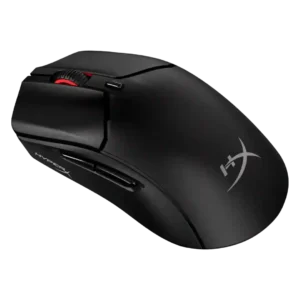
Several reviewers note console and Windows compatibility, including PS and Xbox support when games accept keyboard and mouse input.
Pros: DPI range, switch durability
Cons: software stability, onboard memory

Cross-platform compatibility is positive, with evidence of Windows, macOS software support, Chrome OS, Android, laptops, and iPad-style use cases.
Pros: motion consistency, dock compatibility
Cons: tilt gesture controls, RGB features

Compatibility evidence is positive where mentioned, including Windows/macOS support and the ability to connect to computers or consoles.
Pros: click latency, wireless latency
Cons: weight tuning, skate durability
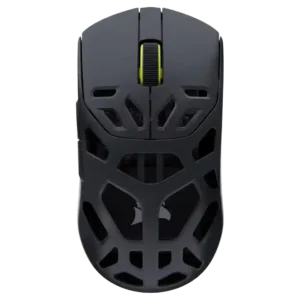
Cross-platform compatibility is supported by the browser-based, platform-independent Web Hub and Bluetooth/mobile-desktop flexibility.
Pros: Accuracy and tracking precision, build quality
Cons: RGB features, debounce customization

Cross-platform compatibility has limited support, based on one review saying Bluetooth 5.1 broadens device compatibility.
Pros: balance and weight distribution, build quality
Cons: MMO gaming suitability, macro support
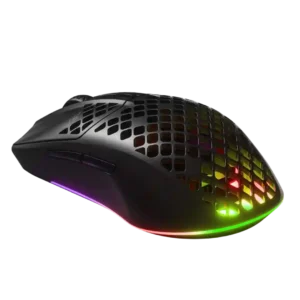
Cross-platform compatibility is lightly supported through one review’s praise for use across multiple devices.
Pros: motion consistency, ergonomic design
Cons: firmware reliability, dock compatibility

Cross-platform compatibility has limited but positive evidence from one reviewer using it across Mac, iPad, Steam Deck, and Windows devices.
Pros: Accuracy and tracking precision, programmable buttons
Cons: weight tuning, firmware reliability

Cross-platform evidence is narrower but positive. Reviewers used or positioned the mouse across Windows, MacBook, work, gaming, and mobile setups, mainly through Bluetooth and tri-mode connectivity.
Pros: weight, sensor performance
Cons: software stability, debounce customization

Cross-platform compatibility is good for multi-device workflows, with reviewers switching between desktop and laptop or using Bluetooth with iPad and work laptops.
Pros: polling rate, charging convenience
Cons: software stability, firmware reliability

Cross-platform evidence is limited but positive, especially from reviews noting Mac support and PC/Mac connectivity.
Pros: macro support, click latency
Cons: dock compatibility, firmware reliability

Cross-platform or multi-device use is a strength where reviewed, mainly because Gear Link works through a browser and Bluetooth pairing supports devices such as a MacBook.
Pros: polling rate, weight
Cons: onboard memory, tilt gesture controls

Cross-platform compatibility is decent for basic mouse use, with Windows, Mac, Android, USB, and Bluetooth use mentioned, but full software control is narrower.
Pros: balance and weight distribution, weight
Cons: tilt gesture controls, RGB features

Cross-PC use is best supported by Gear Link and onboard profiles, which let settings work on another PC after configuration.
Pros: MMO gaming suitability, software stability
Cons: handedness options
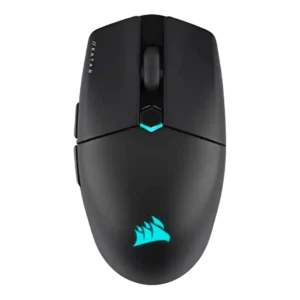
Cross-platform compatibility is supported by one review noting PC or Mac connectivity through wireless, Bluetooth, or wired modes.
Pros: balance and weight distribution, software stability
Cons: MMO gaming suitability, durability over time
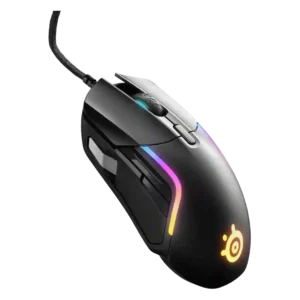
Cross-platform compatibility is supported by Windows and Mac software mentions, plus one review noting Xbox compatibility.
Pros: switch durability, surface compatibility
Cons: weight tuning, skate durability

Review evidence supports broad device compatibility across PCs, Macs, tablets, and phones, although one video noted Bluetooth switching friction.
Pros: switch durability, wireless performance
Cons: click noise, RGB features

Cross-device use is supported by onboard memory, Bluetooth device switching, and replaceable or multi-device ROG receiver support.
Pros: click latency, sensor performance
Cons: palm grip comfort, skate durability

Cross-platform compatibility is context-dependent: multi-device use is supported, but Linux support relies on community tools.
Pros: programmable buttons, Bluetooth support
Cons: handedness options, firmware reliability

Cross-platform compatibility is supported by iCUE being available on Mac and Windows, though customization limits appear in Bluetooth mode.
Pros: motion consistency, connection stability
Cons: tilt gesture controls, water and dust resistance

Cross-platform compatibility evidence was limited but positive through onboard settings used across two machines.
Pros: polling rate, click latency
Cons: RGB features, handedness options

Cross-platform use is supported mainly through Bluetooth, dongle, and wired modes across computers, laptops, tablets, phones, and multiple devices.
Pros: surface compatibility, sensor performance
Cons: tilt gesture controls, MOBA gaming suitability
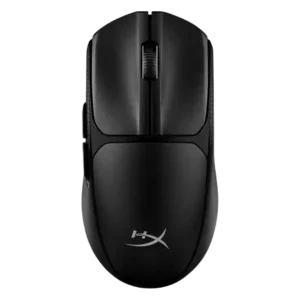
Cross-platform use is supported by Bluetooth and multi-device positioning, with one review explicitly describing the mouse as multi-platform.
Pros: Accuracy and tracking precision, click latency
Cons: side button quality, claw grip comfort

Cross-platform compatibility is supported through Bluetooth, wired, laptop/desktop/phone use, and Windows notes. The strongest caveat is a Windows 10 recognition issue in one review.
Pros: weight, sensor performance
Cons: MMO gaming suitability, software stability

Cross-platform evidence is limited to reviewers using or stating compatibility with Steam Deck, Windows, and Mac, with Linux treated as uncertain.
Pros: sensor performance, programmable buttons
Cons: handedness options, cable flexibility

Cross-platform compatibility is modest but useful: G Hub is available for Windows and Mac, and onboard profiles help on multiple systems after setup.
Pros: DPI range, materials quality
Cons: Bluetooth support, weight tuning
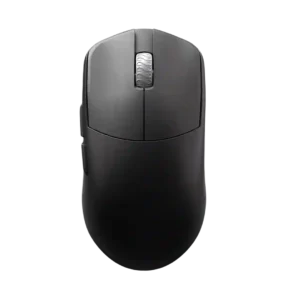
Cross-platform compatibility is supported at a basic connection level for systems with USB 2.0 and above, with MacOS customization caveats.
Pros: Accuracy and tracking precision, sensor performance
Cons: cable flexibility

Software support is directly stated for Windows 10 and macOS 11 or higher, giving the wired model basic cross-platform configuration coverage.
Pros: connection stability, value for money
Cons: Bluetooth support, 2.4GHz connectivity

Cross-platform compatibility is mixed: reviewers confirm Xbox/macOS use cases, but macOS software limitations reduce advanced customization.
Pros: Accuracy and tracking precision, motion consistency
Cons: debounce customization, tilt gesture controls

Cross-platform use is mixed: the mouse can work across Mac and Windows, but Glorious Core is described as Windows-only.
Pros: switch durability, DPI range
Cons: grip texture, portability
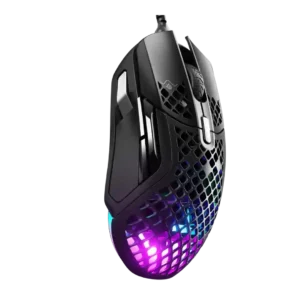
Cross-platform compatibility is supported by Windows and macOS software support, though rival-app comparisons make the broader software experience feel less polished.
Pros: glide smoothness, weight
Cons: handedness options, side button quality

Compatibility evidence is mixed: Windows support is clear, macOS is excluded in multiple reviews, and one review notes Xbox Series X plug-and-play use.
Pros: connection stability, 2.4GHz connectivity
Cons: handedness options, click noise

Cross-platform and multi-machine use is useful through profiles, but one review reports a MacBook detection issue.
Pros: acceleration control, long-session comfort
Cons: Bluetooth support, weight tuning
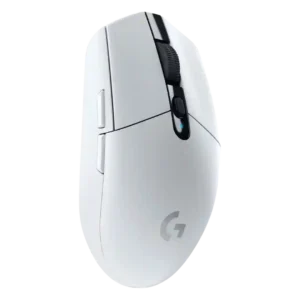
Cross-platform support is mixed: one review lists Windows, Mac, Chrome OS, and Android, but another notes the lack of G Hub on Linux.
Pros: wireless latency, motion consistency
Cons: Bluetooth support, charging convenience

Cross-platform use is helped by the browser-based setup flow, but at least one review notes that firmware updating is restricted to Windows.
Pros: polling rate, weight
Cons: RGB features, Bluetooth support

Cross-platform evidence is limited but present, with console compatibility praised and Windows-only NGENUITY software noted as a constraint.
Pros: wireless latency, connection stability
Cons: palm grip comfort, software stability

Cross-platform compatibility is partial: the mouse is described as Windows and Mac compatible, but software support is Windows-only.
Pros: switch durability, click latency
Cons: wireless performance, wireless latency

Cross-platform support is mixed. G Hub support for Windows and macOS is cited, but the mouse lacks Bluetooth hot-swapping and one review notes Linux users are left out.
Pros: DPI range, wireless latency
Cons: RGB features, Bluetooth support

Cross-platform compatibility is limited because reviewers note Windows software support while macOS support is absent or the full customization suite is Windows-only.
Pros: MMO gaming suitability, onboard memory
Cons: dock compatibility, weight

Cross-platform and system compatibility are mixed: macOS and Windows support is praised, but USB-C and Windows-shortcut limitations appear in some reviews.
Pros: programmable buttons, MOBA gaming suitability
Cons: dock compatibility, handedness options